
TeamSpeak 3 - Voice Chat
TeamSpeak Systems, Inc.Communication
2.81.67K Reviews
- Version
- 3.4.9
- Installs
- 1.00M
- Age Rating
- Teen
Screenshots
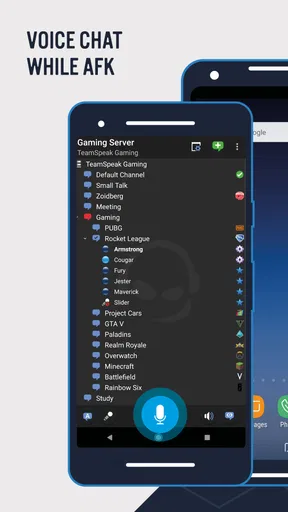
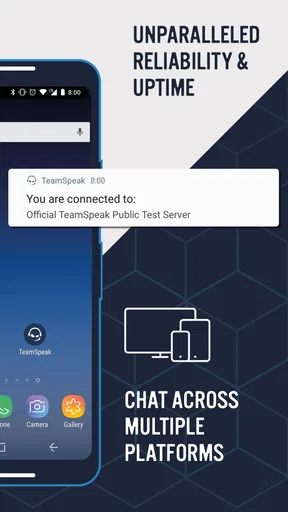
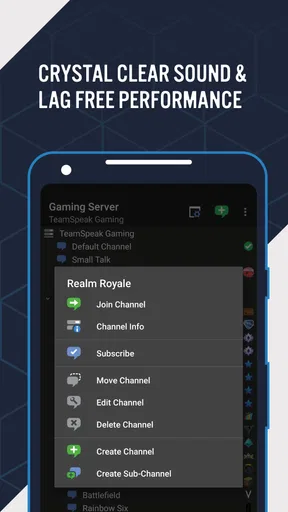
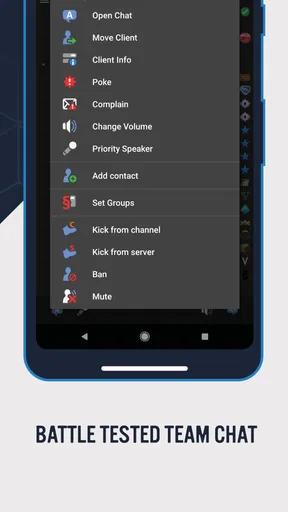
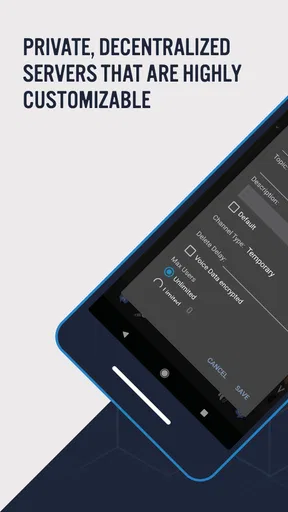
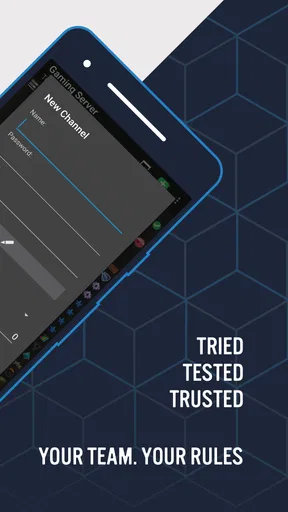
Our Review of TeamSpeak 3 - Voice Chat
 Analysis by Appyee
What I look for in a voice-chat app is not just clear sound; it is whether a conversation can happen without pulling everyone away from what they are doing. TeamSpeak 3 is built around joining a shared voice space, which makes it feel different from messaging apps where every exchange begins with a notification and waits for a reply. In a coordinated game, that can make communication quicker and more natural. In ordinary life, it can also mean that people need to agree on when to join and when to leave.
I see its strongest fit in groups that already have a reason to keep a voice channel available: friends playing together, a guild coordinating an event, or teammates who prefer speaking over typing. The same setup can suit a small work discussion when everyone knows where to meet. If you mainly want casual one-to-one calls, voice notes, or conversations that can be answered later, a familiar messenger may ask less of you. TeamSpeak works best when the group values a shared place to talk rather than a stream of separate messages.
A shared room changes the pace
The useful difference is conversational rhythm. Once people are connected, a short question can be answered immediately, and follow-up instructions do not need to be typed out one message at a time. I find that especially helpful when attention is already divided between a game, a shared task, and the people involved. A quick spoken correction can be clearer than a string of hurried messages, provided everyone is comfortable talking in real time.
That immediacy is not automatically an advantage. If someone joins while others are mid-conversation, they may need context; if the group keeps talking after the activity is over, the channel can become another place competing for attention. I would treat a voice room like a room in real life: useful when there is a shared purpose, less useful when nobody has agreed whether they are available.
Where it fits beside other voice options
Compared with a typical messaging app, TeamSpeak puts live voice at the center instead of treating it as one feature among text, photos, and asynchronous replies. That focus is a good match for coordinated play, but it is less convenient when your group wants one app for every kind of conversation. Compared with a basic group call, the appeal is the more organized server-and-channel approach: people can gather around a continuing community rather than recreating a call for every session.
That organization can be a trade-off for newcomers. A friend who only wants to tap a name and call may find a server-based setup less obvious than a standard phone or messenger call. I would choose the simpler option for spontaneous family check-ins, and consider TeamSpeak when a regular group benefits from returning to the same voice space. It is not a universal replacement for chat apps; its value depends on whether your group actually uses that structure.
Small habits that make voice chat work better
One practical habit is to agree on what the channel is for before a session begins. A group might reserve it for active play and use another way to arrange the next meet-up. That simple boundary prevents the expectation of constant availability and makes it easier to concentrate when you are not in the middle of a conversation.
It also helps to keep spoken instructions brief and specific. In a fast-moving match, say the action and the relevant location first, then explain more if there is time. For a planning discussion, one person can summarize decisions before everyone leaves. These habits are not app features, but they make a live channel more useful and reduce the chance that important details disappear into a long conversation.
Who should pick another tool
If you dislike open-ended voice conversations, share a device or space where speaking would disturb others, or want a complete text-first messenger, I would not make this your default. A group call is also a poor fit when participants have very different schedules and need to contribute at their own pace. TeamSpeak asks people to be present together, and that shared attention is the point as much as the limitation.
For a regular gaming group, though, that bargain can be worthwhile. It gives conversation a clear home, and it lets people coordinate without repeatedly stopping to type. The question I would ask before installing it is simple: will my friends and I actually meet in voice often enough to justify a dedicated tool? If the answer is yes, its focused approach makes sense; if not, an app the group already checks may be easier to sustain.
If you're into gaming or need a reliable voice communication tool, you've probably heard of TeamSpeak 3. It's like that trusty friend who never lets you down during those critical gaming moments. I've been using TeamSpeak 3 for quite some time now, and let me tell you, it's a game-changer in the voice chat world.
Getting Started with TeamSpeak 3
First things first, downloading and setting up the app is a breeze. Whether you're on Android or iOS, you can grab it from the respective app store. The interface is straightforward, and even if you're not the tech-savvy type, you'll find your way around in no time. The app provides a clear and intuitive user experience right from the get-go.
Once installed, creating a server or joining one is as simple as it gets. I love how TeamSpeak 3 allows you to customize your server settings to fit your needs, whether you're hosting a small group chat or a massive guild meeting.
Features That Set It Apart
One of the standout features of TeamSpeak 3 is its high-quality audio. It genuinely feels like you're in the same room as your friends, which is crucial during intense gaming sessions. No more robotic voices or unwanted echoes messing up your strategy talks.
Security is another big win for this app. With military-grade encryption, your conversations are as private as they get. I appreciate the peace of mind knowing my chats are secure.
The app also supports a wide array of plugins and integrations. You can tweak it to your heart's content, adding functionalities that cater to your specific needs. And let's not forget the cross-platform compatibility. Whether your friends are on a PC, Mac, or mobile device, connecting with them is seamless.
Usability and Performance
TeamSpeak 3 is incredibly lightweight, ensuring that it doesn't hog your device's resources. The app runs smoothly in the background, allowing you to game without any hiccups. Plus, the low latency means you're always in sync with your team, which is a lifesaver in fast-paced games.
One thing I particularly enjoy is the app's offline functionality. You can continue to manage your servers and settings even without an internet connection, which is a feature not many voice chat apps offer.
Community and Support
The community around TeamSpeak 3 is vibrant and helpful. Whether you're looking for tips on optimizing your server or need troubleshooting advice, there's always someone ready to lend a hand. The official support is also top-notch, with a plethora of resources and guides available online.
Moreover, the app receives regular updates, ensuring that you're always getting the best possible experience. The developers are proactive in fixing bugs and adding new features, which is always a plus in my book.
Final Thoughts
In a world filled with voice chat apps, TeamSpeak 3 stands out for its reliability, quality, and security. Whether you're a hardcore gamer or just need a robust communication tool, this app has got you covered. It's like having a private room where you can strategize, joke around, and stay connected without interruptions.
If you haven't tried TeamSpeak 3 yet, I highly recommend giving it a shot. It's more than just an app; it's a trusty companion for all your voice communication needs. You can find the download links on our website, so go ahead and dive into a smoother chat experience!
What the mobile app adds to a group routine
The phone version is most useful when it complements a group’s usual setup rather than trying to replace every other way of communicating. For example, I can imagine joining a gaming group from a phone while away from my desk, listening to a plan, and speaking when needed. That convenience depends on having a suitable place to listen and talk; voice chat is not private simply because it happens through a handset, so I would use headphones in shared spaces and avoid joining when I cannot give the conversation attention.
A practical routine is to use voice for decisions that benefit from quick back-and-forth, then move any longer-term details—such as a time to meet or a list of tasks—to a channel the group already uses for written notes. Spoken plans are easy to understand in the moment but easy to forget later. Separating live coordination from information people must revisit is a small workflow choice that makes a voice server more useful without expecting it to function as a full messaging or project-management tool.
Getting a group connected without making it a chore
The main setup question is usually not technical; it is social. Before asking friends to install another communication app, I would check that they are willing to use voice regularly and agree on where the group should meet. A server arrangement is most valuable when members return to it, while a one-off call may be simpler for a single conversation. If the group is split between people who enjoy voice and people who prefer typing, keeping a text-based alternative available avoids making participation depend on speaking.
For someone joining an established community, I would ask for the exact server details and any channel conventions before the first session. That saves time spent searching and helps avoid interrupting a conversation that is already underway. It is also sensible to test the basic connection before an important match or meeting, rather than discovering a setup issue when everyone is waiting. These are simple preparations, but they matter more in a live conversation than they do in a message thread, where a delayed reply is usually less disruptive.
Attention, interruptions, and considerate use
Live audio can reduce the distraction of typing, yet it can also hold attention more firmly than a message because other people expect an immediate response. I would not treat a connected status as a promise to be available indefinitely. Agreeing that a channel is for a particular session, and saying when you are stepping away, makes expectations clearer for everyone. This is especially helpful when a group’s conversation continues socially after the task that brought them together has ended.
There is also a real difference between being able to speak and being in a good situation to do so. A commute, a shared room, or a noisy environment may make listening difficult or expose a private conversation to people nearby. In those moments, a written message or a later call is often the more considerate choice. TeamSpeak is strongest when participants can give the conversation enough attention; it cannot make an unsuitable setting feel private or make a distracted listener catch every instruction.
What the price and reputation mean in practice
TeamSpeak 3 is a paid communication app at $0.99, so I would decide whether its dedicated voice-room style fits my routine before paying rather than choosing it just because a group mentions the name. It is made by TeamSpeak Systems, Inc., and its long-running presence is part of its appeal for communities that already organize around it. The app first appeared on October 7, 2013, and version 3.4.9 is the current release; on Android, it supports devices starting with version 4.2. Its Teen age rating is also worth noticing if a younger person will use it.
Its average rating is 2.8 from around 44,000 ratings, alongside roughly 1,700 written reviews, while installs have passed one million. Those figures are a reminder that the app has an established audience but does not satisfy everyone. I would pay particular attention to how well the mobile workflow suits the way my own group communicates, rather than assuming that a familiar name guarantees a smooth experience on every device. The most useful test is whether joining, listening, and speaking feel straightforward for the people who will actually use it.
My recommendation for the right kind of group
TeamSpeak is easiest to recommend to people who already have a recurring reason to talk together and want voice to be the main event. A close-knit gaming team can benefit from quick callouts; a community can use a familiar shared meeting place; and a small group working through a live task may find conversation more fluid than a long chain of messages. The advantage is not that every exchange becomes better by being spoken, but that the exchanges needing immediate clarification can happen without a typing delay.
For everyone else, I would compare the effort of maintaining a separate voice space with the convenience of the app their friends already open. If your conversations are mostly asynchronous, if speaking is uncomfortable, or if you need written information that remains easy to search and revisit, a messenger or text-first collaboration tool is likely the better fit. TeamSpeak 3 has a clear role, but it is a specific one: it gives a group a place to talk live. When that is exactly what you need, the focus is useful; when it is not, the extra step can become friction.
Verdict
Strengths of TeamSpeak 3 - Voice Chat
- High-quality voice communication.
- Customizable user interface.
- Supports private servers.
- Cross-platform compatibility.
- Low latency and high performance.
Limitations of TeamSpeak 3 - Voice Chat
- Requires learning curve for new users.
- Limited free server options.
- Occasional connection issues.
- No built-in recording feature.
- Outdated design compared to rivals.
Similar Picks in This Category
View All
Google Messages
Google LLC4.6

Gmail
Google LLC4.1

Google Meet
Google LLC4.4

Google Chrome
Google LLC4.1

WhatsApp Messenger
WhatsApp LLC4.6

Carrier Services
Google LLC4.2
Frequently Asked Questions
What is TeamSpeak 3 and how does it work?
TeamSpeak 3 is a voice communication app designed for gamers and professionals who need reliable and high-quality audio chat. It operates through a client-server architecture, allowing users to connect to a central server where they can join channels and communicate with others. It's known for its low latency and customizable features.
Is TeamSpeak 3 free to use?
TeamSpeak 3 offers both free and paid options. The client software can be downloaded for free, but hosting your own server may incur costs depending on the server provider. Alternatively, users can connect to public servers for free, though some may charge for access to premium features or larger groups.
What platforms does TeamSpeak 3 support?
TeamSpeak 3 is available on multiple platforms, including Windows, macOS, Linux, iOS, and Android. This cross-platform support ensures that users can connect and communicate seamlessly, regardless of the device they are using. The mobile versions offer the same core functionality as the desktop versions.
How secure is TeamSpeak 3 for voice communication?
Security is a key feature of TeamSpeak 3. It offers end-to-end encryption for secure voice communication, ensuring that conversations remain private. Users can configure security settings and permissions, and server administrators have full control over user access, making it a trusted choice for secure communication.
Can TeamSpeak 3 be customized?
Yes, TeamSpeak 3 offers extensive customization options. Users can personalize the interface with various themes and skins, and server administrators can create custom channels and permissions. Additionally, there are numerous plugins and add-ons available to enhance functionality and tailor the app to specific needs.
